
Classic inbound port forwarding fails once your router sits behind Carrier-Grade NAT, because there's no public IPv4 address left to forward to. The realistic fixes are: ask your ISP for a public or static IP, switch to native IPv6, or build an outbound tunnel through a service like Cloudflare Tunnel or a low-cost VPS running WireGuard. Pick based on which protocols you need, how permanent the setup must be, and how much you're willing to spend.
TL;DR:
- Most ISPs use CGNAT for IPv4 addresses, which prevents inbound port forwarding unless you request a public or static IP from your provider.
- Native IPv6 can solve CGNAT issues by providing each device with a globally routable address, but only if your ISP supports IPv6 and your client devices are compatible.
- Managed outbound tunnels like Cloudflare Tunnel or ngrok are quick and easy options for web applications, while VPS relays or VPNs provide more control for protocols beyond HTTP/HTTPS.
- Always verify the effectiveness of your fix by running port checks, traceroutes, and external connectivity tests after configuration changes or equipment reboots.
Table of Contents
- How Do You Confirm You're Behind CGNAT?
- Quick Comparison: Which CGNAT Fix Fits You?
- Asking Your ISP for a Public or Static IP
- Does Native IPv6 Solve CGNAT for You?
- How Do Reverse Tunnels Get Around CGNAT?
- When Should You Build a VPS Relay Instead?
- Is an SSH Reverse Tunnel Good Enough?
- Which Fix Matches Your Situation?
- How Do You Verify the Fix Actually Worked?
- Why Trust This Playbook
- What Actually Trips People Up Here
- Use Internet-Analysis to Confirm Your Fix Is Actually Working
- Sources
- FAQ
How Do You Confirm You're Behind CGNAT?
Before touching a single router setting, verify the problem. Log into your router's admin page and note the WAN IP address it reports, then check a public IP lookup site from a browser on the same network. If those two numbers don't match, something upstream is rewriting your traffic.
- Compare the router's WAN IP against an external IP diagnostic tool.
- Check whether the WAN IP falls inside 100.64.0.0/10, the range RFC 6598 reserves for carrier NAT.
- Run a traceroute and look for several ISP-owned hops before traffic leaves the network. Extra unexplained hops near the start usually mean shared NAT infrastructure.
- Test an inbound port with an external port checker and note the exact failure message.
Before calling support, collect these:
- A screenshot of your router's WAN IP
- A screenshot of the public IP shown by an outside lookup
- The traceroute output
- The port checker's failure result
That packet of evidence turns a vague complaint into a specific, hard-to-dismiss ticket.
Quick Comparison: Which CGNAT Fix Fits You?
Once you've confirmed CGNAT, the choice comes down to protocol needs and patience for setup.
- ISP public IP or static IP: Best long-term fix, supports raw TCP/UDP, but costs vary and turnaround can take days to weeks.
- Native IPv6: Free if your ISP supports it, full protocol support, but useless if the client side lacks IPv6 too.
- Cloudflare Tunnel or ngrok: Fast to set up, great for web apps, but largely HTTP/HTTPS focused unless you pay for TCP add-ons.
- Overlay VPNs (Tailscale, ZeroTier): Minutes to deploy, good for personal device access, less suited to public-facing servers.
- VPS relay with WireGuard or frp: Full TCP/UDP control, low monthly cost, but you own the maintenance.
- SSH reverse tunnel: Free and fast for one-off access, fragile without extra tooling to keep it alive.
Asking Your ISP for a Public or Static IP
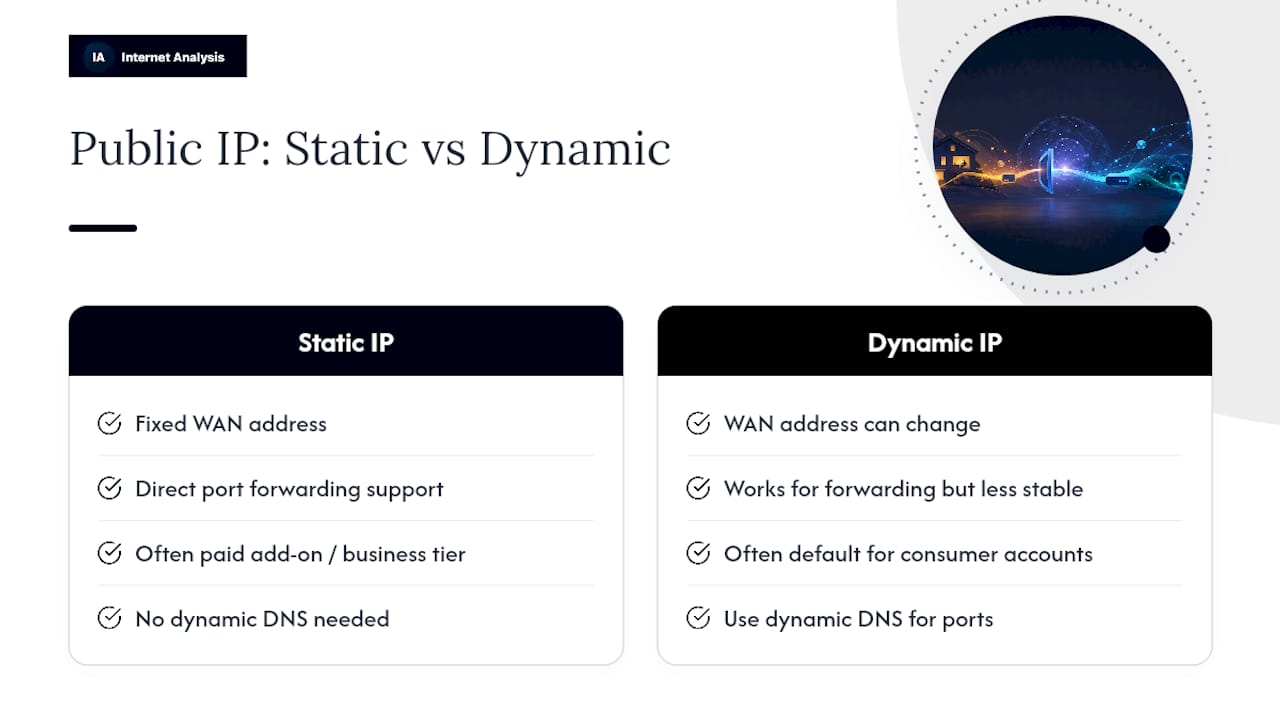
This is the cleanest fix when it's on the table. Call support and state plainly that your connection is behind CGNAT, and reference the WAN IP mismatch and the 100.64.0.0/10 range by name. Many providers offer a static IP as a paid add-on, often bundled with business-tier plans, while others will move consumer accounts off CGNAT on request at no charge. Expect activation times to vary depending on the carrier's provisioning process. Once assigned, confirm the router's WAN IP now matches the address shown by an outside lookup tool.
Pro Tip: Ask specifically whether the new IP is "static" or just "less likely to change." A dynamic public IP still beats CGNAT for port forwarding, but you'll want dynamic DNS if it isn't fixed.
Does Native IPv6 Solve CGNAT for You?
IPv6 sidesteps the whole problem because every device gets its own globally routable address, so there's no NAT layer to strip your inbound packets in the first place.
- Confirm your ISP actually hands out IPv6 to your router, not just IPv4.
- Enable IPv6 firewall rules on your router matching the ports you need open.
- Add an AAAA DNS record pointing to your device's IPv6 address.
- Test reachability using the IPv6 connectivity test to confirm the address resolves and responds from outside your network.
The catch: IPv6 only helps if whoever's connecting to your service also has IPv6, which still isn't universal on mobile carriers or older networks. Game consoles and some client apps also lag on IPv6 support.
How Do Reverse Tunnels Get Around CGNAT?
A reverse tunnel flips the direction of the problem. Instead of waiting for inbound traffic to reach you, your server initiates an outbound connection to a relay, and that relay becomes the public entry point for anyone trying to reach you. CGNAT only blocks unsolicited inbound connections; it doesn't stop your box from calling out, so this works even on the most restrictive carrier networks.
Cloudflare Tunnel and ngrok are the two most common managed options. Cloudflare Tunnel is free for most personal use and pairs naturally with a domain you control, making it a strong fit for self-hosted web dashboards, home automation panels, and small apps. ngrok works similarly but leans toward developer testing, with free tiers capped on bandwidth and session length. Both are largely built around HTTP/HTTPS traffic. Arbitrary TCP or UDP tunneling usually requires a paid plan or a different tool entirely, such as a self-hosted frp server.
- Sign up for the tunnel service and authenticate the command-line agent on your machine.
- Point the agent at your local service's address and port.
- Assign a public hostname (or use the one the service provides).
- Test the public hostname from an outside network to confirm the tunnel actually routes traffic.
Pro Tip: If your use case is a single web app, don't overbuild this with a VPS. A managed tunnel gets you online in under 20 minutes with far less to maintain.
When Should You Build a VPS Relay Instead?
For anything beyond web traffic, a cheap virtual private server with a real public IP becomes the more flexible answer. The architecture is straightforward: the VPS holds a genuine public IPv4 address, your home server opens a persistent WireGuard tunnel (or frp connection) out to that VPS, and the VPS forwards inbound traffic on specific ports back down that tunnel to your internal service. From the outside, connections hit the VPS; internally, they land exactly where you need them.
- Provision a small VPS from any hosting provider and note its public IP.
- Install WireGuard (or frp) on both the VPS and your home server, and bring the tunnel up.
- Configure destination NAT (DNAT) rules on the VPS to forward the ports you need down the tunnel.
- Enable IP forwarding on the VPS so traffic actually passes through instead of stopping there.
Ongoing upkeep includes:
- Keeping VPS firewall rules tight and current
- Watching for tunnel drops after VPS reboots or restarts
- Applying security patches on a box that's now internet-facing
Cost typically runs a low monthly fee for the VPS itself. Latency takes a small hit since traffic now makes an extra hop, but for game servers and other UDP-heavy workloads that need full protocol control, this remains the most dependable option experienced self-hosters reach for.
Is an SSH Reverse Tunnel Good Enough?
For quick, low-stakes access, SSH remote forwarding does the job without installing anything extra. The ssh -R pattern opens an outbound SSH connection from your home machine to a server you control, then asks that remote server to forward a chosen port back through the tunnel to your local service. It's the same outbound-first logic as Cloudflare Tunnel, just done with a protocol nearly every Linux and Mac machine already has.
- Fine for occasional access, quick demos, or checking on a home server while traveling.
- Not fine for anything needing to stay up reliably. Raw SSH tunnels drop when the connection blips and don't reconnect on their own.
- Tools like
autosshor asystemdunit file can restart the tunnel automatically, closing that gap. - Restrict the SSH key to that one forwarding command, and watch login logs for unexpected access attempts.
Treat it as a bridge to something sturdier, not a permanent production setup.
Which Fix Matches Your Situation?
Match the method to what you're actually running, not what sounds most technical.
- Need UDP for a game server? A VPS with WireGuard, or a VPN service that explicitly supports port forwarding, beats managed tunnels, since most of those are HTTP-focused. Check ping and jitter with the cloud gaming speed guide once it's running.
- Just exposing a web dashboard or home automation panel? Cloudflare Tunnel gets you there fastest with the least ongoing maintenance.
- Want a permanent, protocol-agnostic fix and don't mind a phone call? Start with your ISP. Ask directly for a public IPv4 or static IP before building anything else.
- Have working IPv6 on both ends? Use it. It's free and removes NAT from the equation entirely.
How Do You Verify the Fix Actually Worked?
Don't assume success. Confirm it.
- Run an external port check against the exact port you configured, from a network outside your own.
- Traceroute to your public hostname or IP and confirm the path terminates where you expect.
- From a separate network, curl or SSH into the service directly to confirm a real response, not just an open port.
- Reboot your router or VPS and repeat the test. A fix that only survives until the next restart isn't a fix.
RFC 6598 formally reserves the 100.64.0.0/10 block for exactly this kind of shared carrier addressing, which is why seeing that range in your WAN IP settles the diagnosis instantly. Set up a lightweight uptime monitor to ping the service periodically. That's how you catch a tunnel that quietly dropped three days after you stopped checking.
Why Trust This Playbook
RFC 6888 lays out how carrier-grade NAT is supposed to behave, including Port Control Protocol as the theoretical subscriber-side fix. In practice, PCP support across ISPs is inconsistent enough that it isn't a dependable answer for most home users.
- Extensive connection testing across many countries shapes how we describe WAN IP mismatches and public IP verification.
- The diagnostic sequence in this article (WAN IP comparison, 100.64.0.0/10 check, traceroute) mirrors what actually convinces ISP support to escalate a ticket.
- Bring a WAN/public IP mismatch screenshot to any support call. It's the single piece of evidence that gets CGNAT complaints taken seriously.
What Actually Trips People Up Here
Most wasted hours go into re-tweaking DMZ mode, UPnP, or NAT rules on a router that was never the problem. If the WAN IP doesn't match your public IP, no router setting fixes that. Buying a new router is the most common wasted purchase I see recommended online.
Work the list in order: ask the ISP first, try IPv6 second, reach for tunnels or a VPS third. And always bring your ISP hard numbers, not a description of symptoms.
— Tomasz
Use Internet-Analysis to Confirm Your Fix Is Actually Working
Once you've applied a fix, you need proof it holds up, not just a guess. Internet-analysis gives you the exact tests referenced throughout this playbook: an IPv6 connectivity test to confirm your address is reachable, IP diagnostic tools to catch a WAN/public IP mismatch before you call support, and latency and packet-loss checks that reveal whether a tunnel or VPS relay is adding a delay your game server or app can't tolerate.
Run these checks right after switching to a public IP, enabling IPv6, or standing up a WireGuard relay, then again after a router reboot. If you're weighing a VPS-heavy game server setup, the online gaming analysis tool measures the ping and jitter numbers that actually determine playability. For anyone deciding whether to fight CGNAT or just switch providers, the broadband availability checker shows what other plans are available at your address. Start with a free connection test to see exactly where your current setup stands.
Sources
For readers who want the protocol-level detail behind these recommendations, RFC 6888 remains the authoritative document on CGN behavioral requirements, including the PCP mechanism ISPs rarely fully implement. The Wikipedia entry on Carrier-grade NAT covers the 100.64.0.0/10 addressing scheme in plain terms. For workaround specifics, IP-Trackers' breakdown of CGNAT fixes, Open Port Checkers' diagnostic walkthrough, and ExamineIP's comparison of tunnel versus VPS approaches each add useful operational detail this article draws from. Gamers weighing NAT type against multiplayer reliability may also find the partner guide on gaming community best practices useful for understanding how strict NAT affects matchmaking.
- RFC 6888 — CGN Requirements
FAQ
What Is CGNAT and Why Is It Bad?
CGNAT is an ISP-level NAT that shares one public IPv4 address among many customers, which blocks classic inbound port forwarding because inbound packets stop at the ISP's shared NAT instead of reaching your router.
Is CGNAT Just Double NAT?
It's similar in effect but not the same thing. Double NAT usually means two NAT devices you control (like a modem and a separate router), while CGNAT is a NAT layer your ISP controls that you can't configure or bypass from your side.
Should I Have CGNAT On or Off?
Turn it off, or request removal, if you need inbound connections for self-hosting, gaming servers, or remote access. If you never host anything and only browse, CGNAT has no real downside for you.
What ISPs Use CGNAT?
Most major cable and mobile carriers use CGNAT to stretch limited IPv4 address pools across large subscriber bases, though exact policies and opt-out availability vary by provider and plan tier. Check your own WAN IP against a public IP lookup to know for certain rather than assuming based on provider name alone.