
A good internet speed for most homes falls between 100 and 300 Mbps download with 20 to 100 Mbps upload. Start with the FCC's broadband baseline of 100 Mbps download and 20 Mbps upload, then scale up based on how many people and devices share your connection. Remote workers, streamers, and anyone uploading large files regularly should aim for 50 to 100 Mbps upload, rather than settling for the low upload speeds that come bundled with many cable plans. Your next move is simple: run a wired speed test and compare the results against what your plan promises.
Key Takeaways
Good internet speed means matching your download and upload bandwidth to your household's actual activity mix and device count, not chasing the highest advertised number.
| Point | Details |
|---|---|
| Start with the FCC baseline | Use 100 Mbps download / 20 Mbps upload as your minimum, then scale up from there. |
| Size by person, not just plan | Allocate roughly 25 to 50 Mbps per person, more for power users and smart-home devices. |
| Prioritize upload for remote work | Aim for 50 to 100 Mbps upload if you rely on video calls, cloud backups, or livestreaming. |
| Test wired before blaming your ISP | Run wired tests at different times to separate real ISP problems from Wi-Fi issues. |
| Watch latency and packet loss | These affect gaming and calls even when download speed looks perfectly fine. |
Table of Contents
- What Counts as a Good Internet Speed for Streaming, Gaming, and Video Calls
- How to Size Your Home Internet Plan for Your Household
- Why Upload Speed and Latency Matter as Much as Download Speed
- How to Test Your Real Internet Speed and Fix Common Problems
- How Internet-Analysis Helps You Verify and Optimize Your Connection
- Why the Standard Speed Advice Undersells Upload and Latency
- Frequently Asked Questions
- Sources
What Counts as a Good Internet Speed for Streaming, Gaming, and Video Calls
The right speed depends entirely on what you're doing online, not just what number appears on your bill. A single 4K stream and a single video call have wildly different requirements, and stacking activities on top of each other changes the math fast.
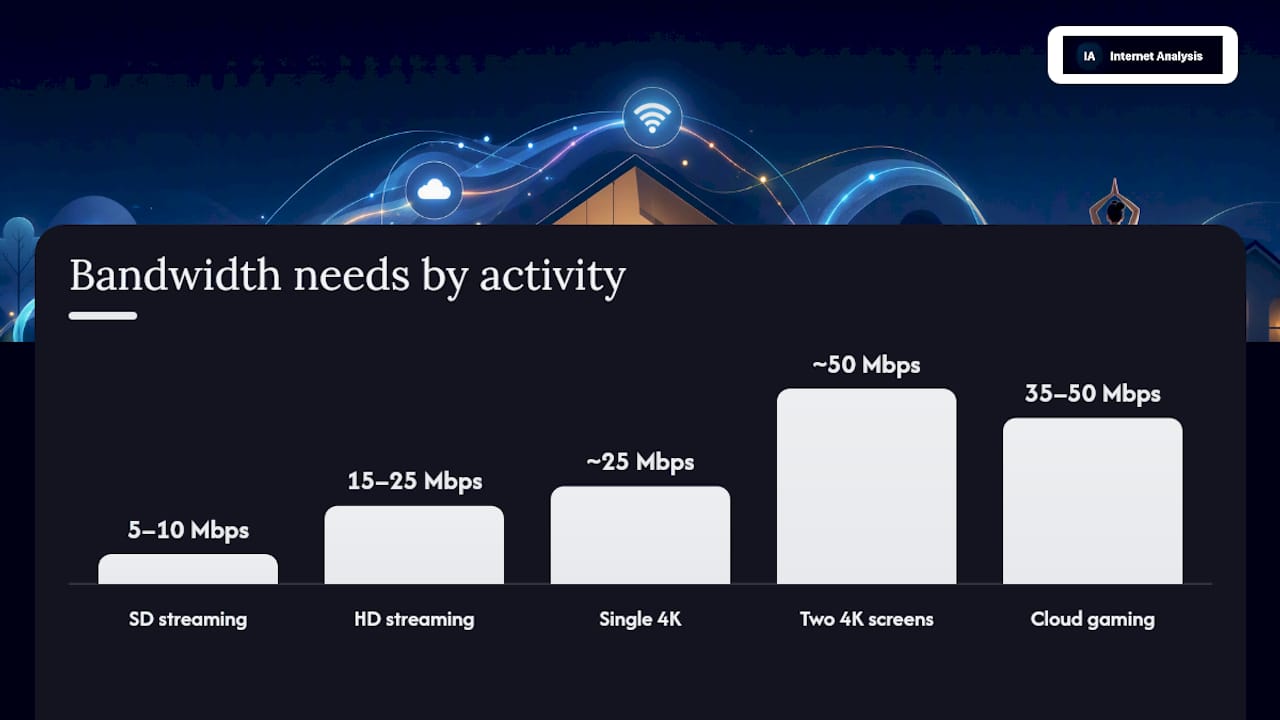
Streaming quality scales predictably with resolution. SD video needs as little as 3 to 4 Mbps, though 5 to 10 Mbps gives you a buffer against network hiccups. HD content needs 5 to 8 Mbps minimum, with 15 to 25 Mbps recommended for smoother playback across multiple screens. 4K streaming is the real bandwidth hog: Consumer Reports notes services like Netflix recommend around 25 Mbps for a single 4K stream, but that figure covers exactly one screen. Add a second 4K TV in another room and you've roughly doubled the requirement.

Gaming works differently. Local multiplayer gaming rarely needs more than 15 to 25 Mbps download, since the actual game data is light. What matters far more is latency, ideally under 30 milliseconds for competitive play. Cloud gaming services flip that equation because they stream full video output to your device in real time, pushing recommended speeds to 35 to 50 Mbps with latency requirements even stricter than local play.
For upload-heavy tasks, the guidance shifts again:
- Video conferencing: 3 to 5 Mbps upload per call, more if you're on camera in HD
- Live streaming to platforms like Twitch: 6 to 13 Mbps upload minimum, though 50 to 100 Mbps upload gives creators headroom for higher bitrates
- Cloud backup services: upload speed determines how fast large photo or video libraries sync, and slow uploads can take backups from hours to days
The FCC's 20 Mbps upload baseline works fine for casual use, but anyone doing regular video calls, livestreaming, or cloud backups will notice the gap once they push past it.
How to Size Your Home Internet Plan for Your Household
The easiest way to figure out what you need is to think in terms of people, not just devices. A workable rule of thumb is 25 to 50 Mbps of download bandwidth per person in the household, with power users and device-heavy homes leaning toward the higher end or beyond. T-Mobile's household guidance puts power users and many-device households in the 500 Mbps to 1 Gbps range, which sounds like overkill until you count every smart speaker, doorbell camera, and streaming stick, actually connected at once.
Three quick examples show how this scales:
- Single user, moderate use: One person streaming, browsing, and video calling fits comfortably in 25 to 50 Mbps.
- Family of four, moderate use: Multiple simultaneous streams, remote schoolwork, and gaming push this range to 100 to 200 Mbps.
- Large household or power users: Smart-home setups with security cameras, multiple 4K TVs, and frequent large file transfers often justify 500 Mbps to 1 Gbps.
Concurrency is the part most people underestimate. A security camera recording continuously, a smart thermostat checking in every few minutes, and a handful of idle phones doing background updates all nibble at your bandwidth even when nobody's actively using them. None of those individually needs much, but they add up, especially in homes with a dozen or more connected devices.
Pro Tip: Add a 20% buffer on top of whatever number you calculate. Real-world speeds fluctuate with network congestion and background traffic, and building in that margin keeps your connection comfortable instead of maxed out.
If your household leans toward the higher end of these estimates, it's worth reading dedicated guidance for large families before choosing a plan.
Why Upload Speed and Latency Matter as Much as Download Speed
Download speed gets all the marketing attention, but it's only part of the picture. Upload speed determines how fast you send data out, which matters for video calls, cloud backups, and livestreaming. Latency, often called ping, measures the delay between an action and a response, and it's the metric that makes or breaks real-time gaming and video conferencing. Jitter is the variation in that delay, which causes choppy audio and video even when your download speed looks fine. Packet loss happens when data doesn't arrive at all, and it's often the real culprit behind dropped calls and game disconnects that a basic speed test won't catch.
Connection type shapes all of this. Cable and DSL plans typically offer asymmetric speeds, fast downloads paired with much slower uploads, because the underlying infrastructure wasn't built for balanced traffic. Fiber connections are usually symmetric, meaning upload and download speeds match, which removes the upload bottleneck entirely.
- Remote workers relying on video calls or VPN connections benefit most from symmetric or high-upload plans.
- Content creators and livestreamers should treat 50 to 100 Mbps upload as a baseline, not a luxury.
- Competitive gamers should prioritize low, stable latency over chasing higher download numbers.
A higher advertised download speed doesn't automatically mean lower latency. Infrastructure and routing matter more than the number on your bill.
How to Test Your Real Internet Speed and Fix Common Problems
Testing correctly takes a few extra minutes, but it's the difference between guessing and knowing.
- Connect a device directly to your router with an Ethernet cable and run a speed test to establish your baseline, since wired tests isolate your actual connection from Wi-Fi interference.
- Repeat the test at different times of day, since evening congestion can drag speeds down noticeably.
- Test on a couple of different devices, and try both wired and wireless to compare.
- Record download, upload, and latency for each test, along with the time, device, and connection type.
If your results look off, work through a short troubleshooting checklist: reboot your modem and router, try a different Ethernet cable or port, confirm your router's firmware is current, and check whether you're on an older Wi-Fi standard that's capping your speeds. Isolate one device at a time to rule out a single culprit, and try switching your DNS server before testing again.
Pro Tip: If wired tests consistently show speeds well below what your plan promises across multiple days and times, that's the evidence your ISP needs. Screenshot the results and contact support with specific numbers, not just "it feels slow."
How Internet-Analysis Helps You Verify and Optimize Your Connection
Running a single speed test tells you one moment in time. Diagnosing a real problem takes more than that, which is where a fuller diagnostic suite earns its keep.
Internet-analysis measures download and upload speeds, latency and jitter, packet loss, DNS performance, and traceroute paths, all from actual test data rather than estimates. The platform draws on over 25 million tests run across 180+ countries, aggregated without personal tracking, so results reflect real-world performance rather than a single lab condition.
A practical workflow looks like this:
- Run a wired test first to establish your true baseline speed and latency.
- Check historical trends to spot patterns, like slowdowns that repeat at the same time each evening.
- Review packet loss and latency specifically, since these often point to ISP-side issues rather than anything happening inside your home.
- Finally, test Wi-Fi in different rooms to isolate whether the problem is your router, not your provider.
Why the Standard Speed Advice Undersells Upload and Latency
Most speed guidance still treats download Mbps as the whole story, and that's a mistake the research doesn't support. The FCC's 100/20 baseline is a floor, not a target, and treating it as sufficient ignores how lopsided most cable and DSL plans really are on upload.
The household math matters more than brand comparisons ever will. A family chasing a flashy 1 Gbps download tier while stuck on a 10 Mbps upload connection will still struggle with laggy video calls and slow cloud backups. That's the gap conventional advice glosses over: raw download speed is the easiest number to advertise, but it's rarely the number causing your actual frustration.
If you take one thing from this, prioritize testing your real upload and latency numbers before you upgrade anything. A wired test that shows strong, consistent latency and adequate upload speed often means your existing plan is fine, and the real fix is router placement or an aging Wi-Fi standard, not a bigger bill.
Frequently Asked Questions
What is a good internet speed for a household of four?
Most families of four with moderate streaming, gaming, and remote work needs do well with 100 to 200 Mbps download. Households with heavier smart-home device counts or frequent 4K streaming across multiple TVs should lean toward the higher end.
Is 100 Mbps fast enough for a family?
It can be, especially for two to three people with moderate use. The FCC sets 100 Mbps download as its broadband baseline, but larger households or heavy simultaneous streaming may find it tight during peak hours.
What internet speed do I need for working from home?
Most remote work, including video calls and cloud file access, runs comfortably on 25 to 100 Mbps download with at least 10 to 25 Mbps upload. Heavy VPN use or frequent large file uploads pushes that recommendation toward 50 to 100 Mbps upload.
Why is my internet slow even though my speed test looks fine?
A clean download number doesn't rule out latency spikes, packet loss, or Wi-Fi congestion inside your home. Testing the specific cause usually points to router placement, an outdated Wi-Fi standard, or too many devices competing for bandwidth at once.
Does upload speed matter as much as download speed?
For video calls, livestreaming, and cloud backups, yes. Upload speeds of 50 to 100 Mbps prevent the stuttering and slow syncing that asymmetric cable and DSL plans are prone to.
Ready to see exactly where your connection stands? Run a full diagnostic, including download, upload, latency, and packet loss, on Internet-analysis's speed test and compare your real numbers against what your plan promises.
Sources
For further reading, see the FCC's broadband speed guide, BroadbandNow's guide to recommended speeds, and run your own numbers on Internet-analysis's speed test.
- Broadband Speed Guide | Federal Communications Commission
- What Internet Speed Do You Need
- What Is a Good Internet Speed? Download & Upload Guide
- How much internet speed do you need? | Consumer Reports