

Yes, 100 Mbps is enough for most households, as long as you don't have several people running heavy-bandwidth tasks at the exact same moment. The FCC still classifies 100 Mbps download as broadband-grade service [FCC report], and Forbes reports that it typically covers downloading, streaming, gaming, and video calls for many homes. The catch is concurrency: a household with several people running high-bandwidth tasks at once may feel the ceiling.. If that sounds like your house, run a quick speed test now before you decide anything else.
Key Takeaways
A 100 Mbps connection meets the needs of most single-person and two-person households, but concurrent heavy use, not the plan's headline number, is what actually determines whether it holds up.
| Point | Details |
|---|---|
| Verdict for most homes | 100 Mbps covers streaming, gaming, and video calls for one to two active users at a time. |
| Watch upload speed too | Video calls and cloud backups depend on upload bandwidth, which is usually far lower than download on a 100 Mbps plan. |
| Concurrency drives upgrades | Households stacking three or more heavy-bandwidth activities at once should consider 200 to 300 Mbps. |
| Test before buying speed | Wired versus wireless results and peak-hour testing reveal whether the ISP or the home network is the real bottleneck. |
| Diagnose deeper with Internet-analysis | Internet-analysis's network quality and alternative speed test tools isolate latency, jitter, and packet loss issues a basic test misses. |
Table of Contents
- What Does 100 Mbps Actually Measure?
- How Many Devices Can 100 Mbps Actually Support?
- Why Does 100 Mbps Sometimes Feel Slower Than It Should?
- When Should You Upgrade Past 100 Mbps?
- How Do You Test Whether Your 100 Mbps Plan Is Actually Delivering?
- What Diagnostics Reveal Problems a Basic Speed Test Misses?
- When I'd Keep 100 Mbps, and When I'd Upgrade
- Run a Full Diagnostic Before You Pay for More Speed
- Frequently Asked Questions
- Sources
What Does 100 Mbps Actually Measure?
Mbps stands for megabits per second, and it measures throughput, not quality. Download speed determines how fast data arrives at your device, which is what most plans advertise front and center. Upload speed determines how fast data leaves your device, and it matters more than people assume for video calls, cloud backups, and livestreaming.
Most 100 Mbps residential plans are asymmetrical, meaning upload speed sits far below the advertised download number, often significantly lower. That's fine for basic use but noticeable if you're constantly backing up photos or hosting Zoom calls with a full camera feed.
Throughput alone doesn't tell the whole story. Several other factors shape how a connection actually feels:
- Latency (ping): the delay between sending a request and getting a response, critical for gaming and calls.
- Jitter: inconsistency in that delay, which causes choppy audio or video.
- Packet loss: data that never arrives, which shows up as freezing or dropped calls.
A connection can hit its full 100 Mbps on a speed test and still feel sluggish if latency or packet loss is high.
How Many Devices Can 100 Mbps Actually Support?
The honest answer depends on what's running, not just how many devices are connected. A phone checking email uses almost nothing. A 4K Netflix stream on the living room TV is a different story.
Here's what 100 Mbps typically handles, based on guidance from T-Mobile and BroadbandNow:
- HD streaming (1080p): roughly 5 to 8 Mbps per stream.
- 4K streaming: roughly 15 to 25 Mbps per stream.
- Video calls (up to 1080p): roughly 3 to 6 Mbps down and up, combined.
- Casual online gaming: 10 to 25 Mbps is usually plenty; latency matters more than raw speed.
- Cloud backups and large downloads: can spike usage temporarily to whatever bandwidth is available.
A rough rule of thumb from providers is to budget a moderate amount of Mbps per person actively using the connection at a given moment. That gives you a workable planning number without needing to track every device.
Picture a single professional working from home who streams music and takes video calls. That person rarely touches 30 Mbps at once, leaving plenty of headroom on a 100 Mbps plan. Now picture a family of four: two teenagers streaming 4K on separate TVs, one parent on a video call, and a phone auto-backing up photos in the background. That's easily 60 to 80 Mbps of simultaneous demand, which starts to eat into the ceiling. Shentel notes that single or two-person gaming households can typically get by on moderate speeds like 100 Mbps, while competitive multiplayer households with several active gamers may need higher, such as 200 Mbps or more. If your household matches that busier profile, our breakdown of 100 Mbps for families walks through more device-count scenarios.
Why Does 100 Mbps Sometimes Feel Slower Than It Should?
A plan rated at 100 Mbps rarely delivers exactly 100 Mbps to every device in your house, and the gap usually has nothing to do with your ISP's advertised number. The FCC's Measuring Broadband America research has repeatedly documented meaningful gaps between advertised and measured broadband performance, which is exactly why testing your own connection matters more than trusting the plan label.
Common culprits that quietly cut into usable speed:
- Wi-Fi signal loss: walls, distance, and interference can cut wireless throughput by half or more.
- Aging routers: older hardware may cap out well below your plan's rated speed.
- ISP contention: shared neighborhood infrastructure slows down during peak evening hours.
- Background uploads: cloud backups, security camera feeds, and software updates eat bandwidth silently.
- VPNs and content filters: both add processing overhead that reduces throughput.
Speed isn't the only variable, either. Latency and packet loss can wreck a gaming session or video call even when download numbers look fine, because a lag spike or a dropped packet interrupts the connection regardless of how many Mbps are technically available.
Pro Tip: Run one speed test over Wi-Fi and one with an ethernet cable plugged directly into your router. If the wired result is dramatically higher, your bottleneck is your wireless setup, not your plan.
Pro Tip: Schedule large cloud backups and software updates for the middle of the night. It's a free way to reclaim bandwidth during the hours you actually use your connection.
When Should You Upgrade Past 100 Mbps?
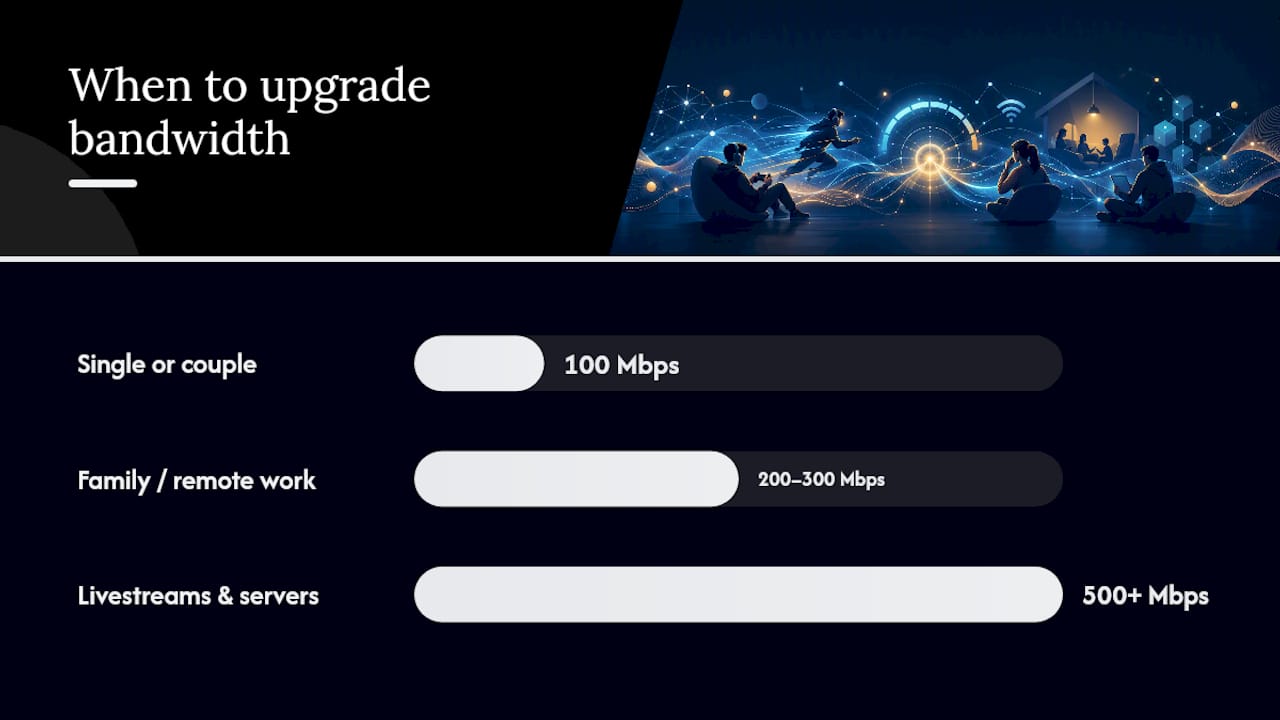
Not every slowdown means you need a bigger plan. Testing and optimizing first often solves the problem for free. But certain signals genuinely point toward needing more bandwidth.
Keep 100 Mbps if:
- You're a single person or couple with light to moderate streaming and browsing habits.
- Your speed tests consistently land close to 100 Mbps at peak hours.
- You don't run more than two or three bandwidth-heavy tasks simultaneously.
Consider 200 to 300 Mbps if:
- You're a family of three or more with multiple 4K streams or gaming sessions overlapping regularly.
- You work from home with frequent video calls layered on top of household streaming.
- You want headroom for smart home devices, security cameras, and guests.
Consider 500 Mbps or higher if:
- You livestream, upload large files regularly, or run a home server.
- You have five or more people actively online at once during peak hours.
- Multiple people work remotely from the same household simultaneously.
If you're on the fence, our comparison of 200 Mbps for remote work and 300 Mbps for larger households breaks down the next tiers in more detail. BroadbandNow recommends 200 to 300 Mbps as a safer baseline for the average household, largely because device counts keep climbing. Cisco's Annual Internet Report documents that exact trend, tracking steady growth in per-household bandwidth demand as smart devices multiply.
How Do You Test Whether Your 100 Mbps Plan Is Actually Delivering?
Before upgrading anything, confirm what you're actually getting. This takes about ten minutes and gives you real evidence instead of a guess.
- Reboot your router and modem, then wait two full minutes before testing.
- Run a speed test with a device connected directly via ethernet cable.
- Run the same test over Wi-Fi, from the room where slowdowns happen most.
- Repeat both tests during peak hours (typically 7 to 10 PM) and again during off-peak hours (midmorning).
- Note download speed, upload speed, latency, and packet loss for every test.
- Record the time, device, connection type, and server location for each result.
Once you have the numbers, they tell a clear story. A wired result landing close to 100 Mbps means your plan is delivering as promised, and any complaints point to your home network instead.
What Diagnostics Reveal Problems a Basic Speed Test Misses?
A basic download number can look perfectly healthy while something else quietly wrecks your experience. Latency spikes during a video call, jitter that garbles voice audio, or a single bad hop on a traceroute can all sit hidden behind a clean speed test result.
Deeper checks worth running when something feels off:
- Sustained latency and jitter over time, not just a single snapshot, to catch intermittent issues.
- Packet loss testing, since even 1 to 2% loss can cause visible stutter in calls and games.
- Traceroute analysis, which shows exactly which hop between you and a server is adding delay.
- DNS resolution time, since slow DNS lookups can make browsing feel sluggish even on a fast connection.
- VPN impact testing, comparing performance with and without a VPN active.
Consider a household reporting choppy video calls despite a speed test showing 95 Mbps down. A latency and jitter check over a 30-minute window reveals spikes every few minutes, and a traceroute isolates the delay to a single hop outside the home network, pointing to an ISP routing issue rather than anything wrong with the router. That's the difference between guessing and knowing.
Pro Tip: If a speed test looks fine but something still feels wrong, packet loss and jitter are the two metrics most likely to explain it. Our diagnostic guide for a fast test but slow-feeling internet walks through isolating the cause.
When I'd Keep 100 Mbps, and When I'd Upgrade
My rule of thumb: if your household has one or two people and you're not routinely stacking three or more bandwidth-heavy tasks at once, 100 Mbps is fine, full stop. The moment you add a third or fourth concurrent heavy user, whether that's a gamer, a streamer, or a remote worker on constant video, the math changes fast. Test before you buy. Paying for 500 Mbps to fix a problem caused by an old router or bad Wi-Fi placement wastes money every single month.
Run a Full Diagnostic Before You Pay for More Speed
Upgrading your plan is the expensive fix. Running a full diagnostic first is the free one, and it often reveals that your 100 Mbps connection was never the problem in the first place. Internet-analysis gives you the same depth of visibility that pinpoints whether a bottleneck sits with your ISP, your router, or your Wi-Fi setup, before you commit to a bigger monthly bill.
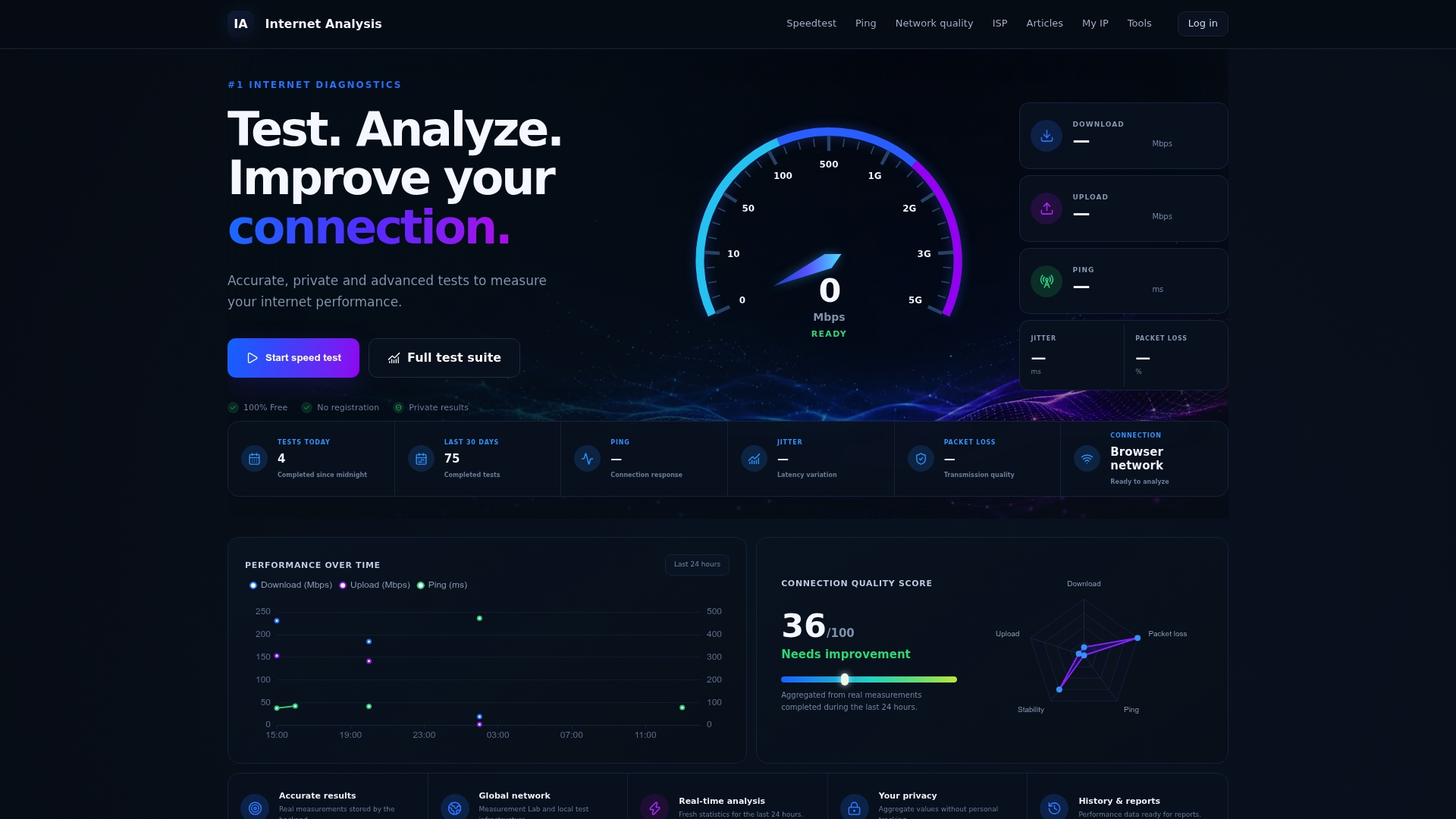
A standard speed test only tells you download and upload numbers. Internet-analysis's network quality test adds latency, jitter, and packet loss into one clear report, so you can see exactly where a slowdown originates. That distinction matters because a plan delivering its full 100 Mbps with high packet loss will still feel broken, and no upgrade fixes that particular problem. The platform runs on real measurements from a global testing network, spanning more than 25 million tests across 180-plus countries, aggregated without personal tracking.
If your calls keep dropping or your streams keep buffering, run the alternative speed test for a fuller metric breakdown before you call your provider or shop for a new plan.
Frequently Asked Questions
Is 100 Mbps good for streaming? Yes, 100 Mbps comfortably supports multiple HD streams and one or two simultaneous 4K streams, since a single 4K stream typically uses only 15 to 25 Mbps.
Is 100 Mbps enough for gaming? For casual gaming, yes. Online gaming rarely needs more than 10 to 25 Mbps, and latency matters far more than raw download speed for a smooth experience.
Is 200 Mbps or 300 Mbps a meaningful upgrade over 100 Mbps? For larger households with several people streaming, gaming, or video calling at once, yes. The extra headroom reduces the odds of congestion during peak hours, though a single-person household rarely needs it.
How fast is 100 Mbps in practical terms? It can download a large HD movie file in a couple of minutes and handle several video calls at once, but it will feel constrained if five or more devices demand heavy bandwidth simultaneously.
Does 100 Mbps meet the needs of a remote worker with video calls? Usually, yes, since a typical 1080p video call needs only 3 to 6 Mbps combined. Problems tend to trace back to Wi-Fi congestion or router placement rather than the plan itself.
Sources
- Is 100 Mbps Fast, And What Can You Do With It? — Forbes
- How Much Internet Speed Do You Really Need — BroadbandNow
- 100 and 300 Mbps Internet Speed: Everything You Need to Know | T-Mobile
- Cisco Annual Internet Report (white paper)