

Symmetrical internet gives you equal upload and download speeds, and that equality pays off directly for anyone sending large or continuous data upstream: video calls, cloud backups, live streams, and remote work file transfers. The core benefit is fewer bottlenecks on the outbound side of your connection, not faster downloads. Casual households that mostly stream shows and browse rarely need it, since most standard cable plans already push downloads far past what those tasks require.
TL;DR:
- Symmetrical internet is most beneficial for users with high upload demands, such as streamers, video callers, or large file uploaders, who need true upload speeds matching download rates.
- Fiber plans can offer true symmetry due to their dedicated glass strand infrastructure, but not all fiber services are automatically symmetrical, so confirm specific upload speeds before purchasing.
- For households with routine activities like streaming videos or browsing, a cheaper asymmetric plan is usually sufficient, as their upload needs rarely justify a premium.
- Testing your actual upload performance during peak hours helps determine whether a faster or symmetrical plan will resolve current bottlenecks, especially if video calls or backup speeds seem slow.
- Upgrading to symmetrical internet makes the most sense when multiple upstream tasks run simultaneously and regularly, and only if your current upload speeds are significantly limiting your workflow.
Table of Contents
- What Symmetrical Internet Benefits Actually Come From
- Why Upload Speed Matters More Than You Think
- The Practical Advantages Households and Businesses Notice
- When Symmetrical Speeds Aren't Worth the Premium
- How to Choose a Symmetrical Plan for Your Situation
- How to Test Whether Upload Is Actually Your Bottleneck
- Which Providers Offer Symmetrical Speeds
- Why Symmetrical Availability Matters More Now
- Check Your Upload Speed Before You Upgrade
- Sources
- FAQ
What Symmetrical Internet Benefits Actually Come From
Symmetrical internet means your upload speed matches your download speed. A plan with equal upload and download speeds gives the same speed in each direction, while a typical cable plan has much lower upload speeds compared to download speeds.
Cable and DSL were built decades ago around one assumption: people download far more than they upload. Cable networks split shared bandwidth using a protocol called DOCSIS, which by design allocates a smaller portion of the channel to upstream traffic. DSL runs into a similar constraint over copper phone lines, where upload capacity has always trailed download capacity by a wide margin.
Fiber-optic lines don't inherit that constraint. Because fiber transmits data as light pulses over dedicated glass strands rather than sharing a coaxial cable segment with neighbors, providers can allocate equal bandwidth in both directions without the same engineering trade-offs.
- Cable and DSL: asymmetric by infrastructure design, not by choice
- Fiber: capable of true symmetry, though not every fiber plan uses it
- The gap matters most the moment you need to send data out, not pull it in
Why Upload Speed Matters More Than You Think
Video calls are the clearest example. A single participant in a standard HD Zoom call needs moderate upload bandwidth, but that demand increases quickly as more people use video calls simultaneously. On an asymmetric plan with limited upload bandwidth, multiple simultaneous video sessions can use up nearly the full upload capacity before other activities start.
Cloud backup timing tells a similar story. Uploading a 10 GB project folder at 20 Mbps upload takes around 70 minutes; the same folder at 500 Mbps upload finishes in under three minutes, based on TechRadar's file-transfer comparisons. That gap compounds for anyone running automatic nightly backups of large media libraries or client files.
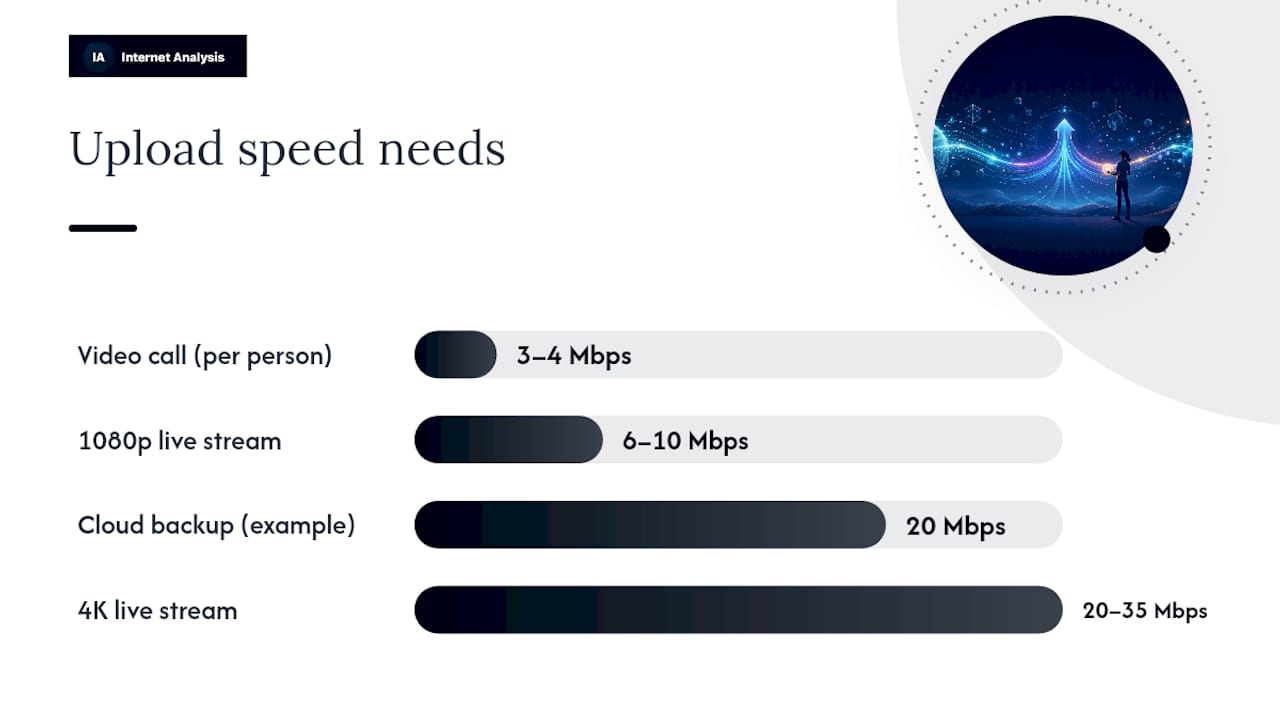
Live streaming has its own thresholds. Sustained upload of roughly 6 to 10 Mbps supports smooth 1080p60 streaming, while 4K streaming needs 20 to 35 Mbps sustained, not burst, upload. Smart-home security cameras add continuous background load too. Multiple 4K cameras uploading around-the-clock can add up to demand that rivals a video call, based on bandwidth estimates from All West.
Gaming is the exception worth flagging. Upload speed rarely limits competitive gaming performance; latency and packet loss matter far more for responsiveness. Upload only becomes relevant if you're streaming your gameplay to an audience or hosting a game server locally.
- Video calls: 3 to 4 Mbps upload per participant, more for multiple simultaneous calls
- Cloud backup: upload speed directly determines transfer time, especially for large files
- Live streaming: 6 to 10 Mbps for 1080p, 20 to 35 Mbps for 4K
- Security cameras: continuous Mbps draw per camera, multiplied across devices
- Gaming: latency and packet loss matter more than upload in most cases
Pro Tip: If your household runs three or more upstream tasks at once, upload speed and download speed both deserve a look. It's rarely one or the other.
The Practical Advantages Households and Businesses Notice
Once upload capacity stops being the limiting factor, the improvements show up in ordinary daily tasks rather than abstract numbers.
- Large file uploads and project syncs finish in a fraction of the time, which matters for anyone sending video, design files, or backups to clients
- Multi-person video meetings run smoother, with less compression artifacting and fewer freezes during screen sharing
- Cloud backups complete on schedule instead of lagging into work hours, reducing the window where a lost laptop means a lost backup
- Live streams hold higher bitrate without dropped frames, which shows up as noticeably sharper video on the viewer's end
- Multiple upstream-heavy tasks stop competing for the same narrow lane, so a video call doesn't degrade the moment a backup kicks in
Pro Tip: Screen-sharing quality is one of the fastest ways to feel the difference. A tool like kinodesk depends on steady upload capacity to keep shared screens crisp instead of blurry or lagging behind your cursor.
When Symmetrical Speeds Aren't Worth the Premium
Symmetrical fiber plans typically cost more than comparable download-heavy cable plans, and availability still lags behind cable in many areas. That combination means the upgrade doesn't pay off for everyone.
- A household that mostly streams video, browses, and plays single-player games gets little practical benefit from matched upload speeds
- If your upload demand rarely exceeds 10 to 15 Mbps even during peak use, a cheaper asymmetric plan likely covers your needs
- Prioritize higher download speed instead if your main activities are streaming 4K video or downloading large files, not sending them
- The simplest decision rule: match the upgrade to your actual upstream workload, not to the marketing appeal of a "gig symmetrical" plan
Reviews that casual users are the group least likely to notice a difference after switching, which is worth remembering before paying a premium for capacity you won't use.
How to Choose a Symmetrical Plan for Your Situation
Matching the plan to the workload starts with knowing your own numbers, not the provider's marketing tier names.
- Single remote worker on video calls and cloud tools: 20 to 50 Mbps sustained upload usually covers it
- Multi-worker household with overlapping calls and backups: 100 to 300 Mbps upload gives real headroom
- Content creator or regular streamer: 35 to 100+ Mbps upload, depending on stream resolution and simultaneous recording
- Home with multiple 4K security cameras: budget upload capacity per camera, then add a buffer for other devices
Before signing up, run through a short checklist:
- Confirm the advertised upload number in writing, not just the plan name
- Ask whether that upload speed is sustained or a burst rate that drops under load
- Check for data caps that could throttle uploads during heavy backup or streaming periods
- Ask about contention ratios, meaning how many other households share your local capacity at peak hours
- Ask directly whether the provider offers any service-level guarantee on sustained upload performance
Households weighing whether a full gigabit plan is worth it should apply the same math: size the plan to the workload, not the marketing number.
How to Test Whether Upload Is Actually Your Bottleneck
Guessing wastes money in both directions, either overpaying for capacity you don't use or underbuying and fighting slowdowns you can't explain. Testing settles it.
- Step 1: Run a baseline speed test measuring download, upload, and latency during a quiet period, then repeat it during your household's peak evening hours
- Step 2: Reproduce the actual task while measuring, whether that's uploading a real file, starting a video call, or launching a stream, and watch upload throughput and packet loss during the task itself
- Step 3: Interpret the pattern. If upload consistently drops well below the advertised number during real tasks, or packet loss climbs above roughly 1 to 2% under load, upload capacity is likely your bottleneck rather than Wi-Fi or device issues
- Step 4: Set up repeated tests across a few days to catch peak-hour contention that a single test might miss
The FCC's broadband speed guidance makes the same point: download and upload numbers each matter for different activities, and neither tells the full story alone. Aggregated, privacy-forward testing across a large sample of real connections gives a more honest baseline than any single advertised speed, since it reflects what similar households actually experience rather than a best-case lab figure.
Which Providers Offer Symmetrical Speeds
Fiber's architecture is what makes symmetry possible at scale; cable and DSL infrastructure simply weren't built for it. That's why the providers most associated with symmetrical tiers are fiber-first companies.
- AT&T Fiber offers symmetrical upload and download on most of its fiber tiers
- Verizon Fios built its fiber network around matched upload and download speeds from the start
- Google Fiber markets symmetrical speeds as a core feature of its plans
- Frontier Fiber offers symmetrical tiers in its fiber footprint
Availability and exact upload figures vary by address and plan tier, and not every fiber plan is symmetrical by default. Confirm the upload number in writing and check whether it's shared or dedicated capacity before you sign.
Why Symmetrical Availability Matters More Now
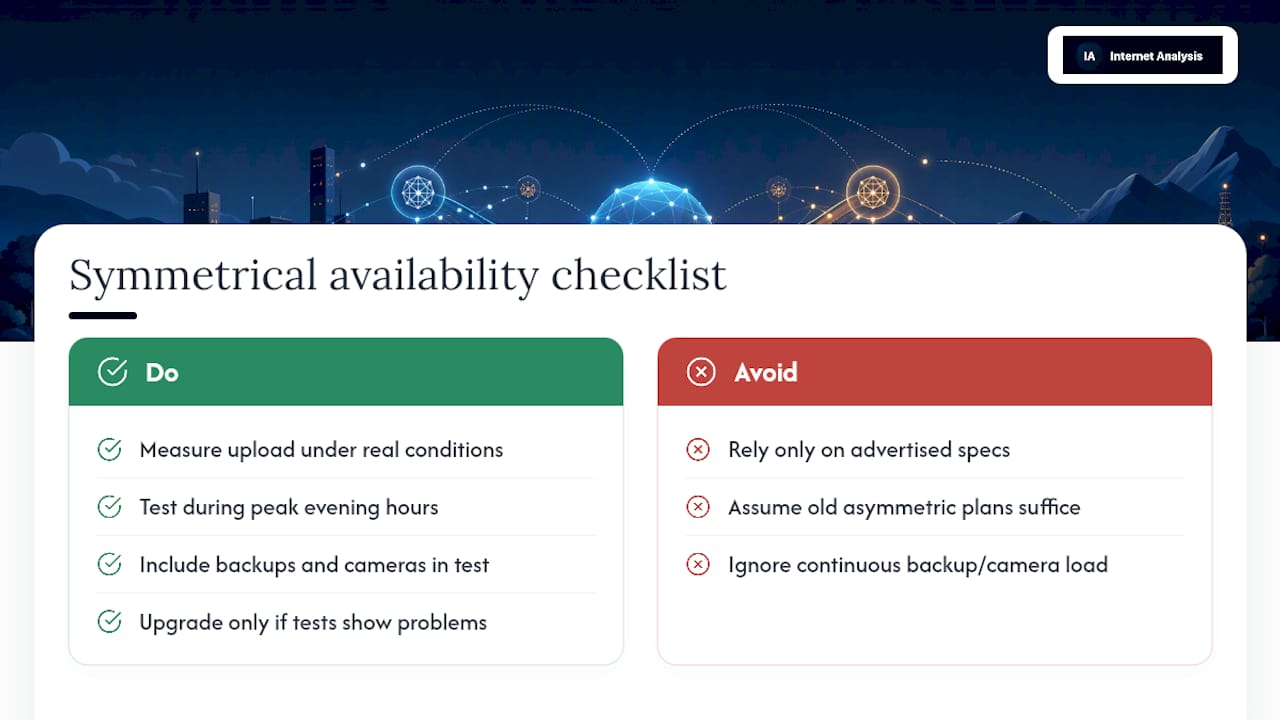
Upstream demand has quietly outgrown what most asymmetric plans were designed for. Backups run continuously, cameras stream around the clock, and video calls compete for the same narrow upload lane households were sold a decade ago. What's changed isn't the marketing, it's the workload.
Advertised specs still tell you what a provider promises, not what your connection delivers at 8 p.m. on a weeknight. Measuring your own upload performance under real conditions remains the only way to know whether a symmetrical upgrade solves an actual problem or just adds cost.
— Tomasz
Check Your Upload Speed Before You Upgrade
Before paying a premium for symmetrical service, find out whether upload is even your problem. The platform runs upload, latency, and packet loss diagnostics side by side, so users can see where a connection falls short instead of guessing from an advertised number.
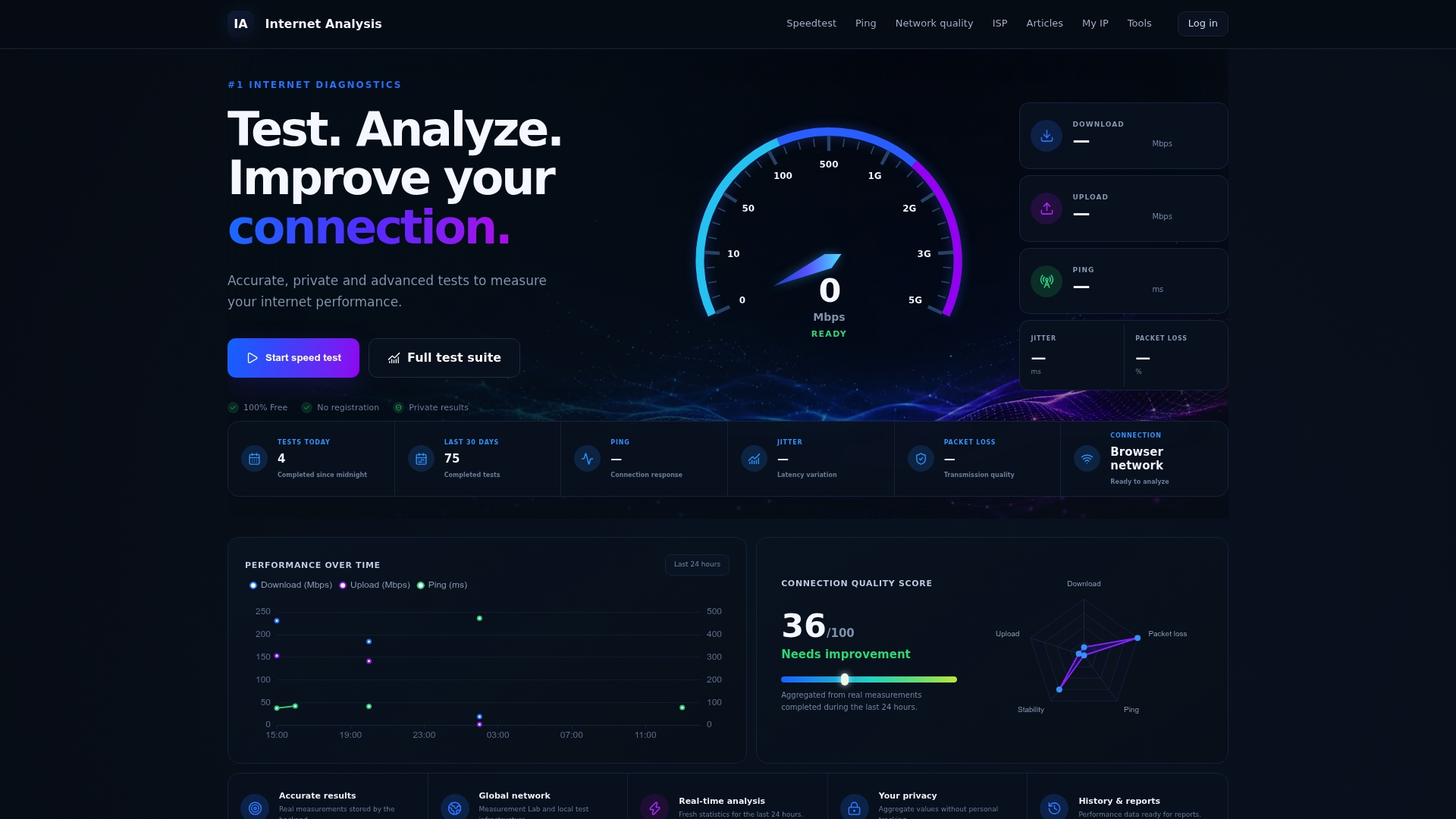
The platform draws on real-world measurements from a global test network rather than lab conditions, and every result gets aggregated without personal tracking attached. With tests run across 180+ countries, the baseline reflects what similar households actually experience during peak hours, not a best-case figure from a brochure. Historical tracking also shows whether a slowdown is a one-time fluke or a pattern worth acting on.
If video calls stutter or backups crawl, test your connection's upload and latency now and see whether the bottleneck is upload capacity, contention, or something else entirely before you commit to a pricier plan.
Sources
FAQ
Is Symmetrical Internet Worth It?
It's worth it if you regularly upload large files, run video calls, back up to the cloud, or stream live video; casual browsing and streaming households usually don't notice enough difference to justify the price premium.
What Is Symmetrical Internet Service?
Symmetrical internet service delivers the same speed for uploads and downloads, unlike standard cable or DSL plans that offer fast downloads but much slower uploads.
Is AT&T Fiber Internet Symmetrical?
AT&T Fiber offers symmetrical upload and download speeds on most of its fiber tiers, though you should confirm the exact figures for your address and plan.
Is Xfinity Symmetrical Speed?
Xfinity runs primarily on cable infrastructure, which is asymmetric by design, so most Xfinity plans offer far lower upload speeds than download speeds. Check the specific plan's fine print, since some newer tiers narrow that gap without fully closing it.